
Managing the deceased's bank or building society accounts is similar to managing assets and liabilities, however, you first need to make sure that you have ticket the IHT406 option on the Inheritance Tax account tab of Estate Details - Edit. In the event you need to enter details for a joint bank account, this needs to be recorded under the Assets/Liabs option for the IHT404.
Adding Bank Accounts
Within Wealth Management, Client tab, select the Load Data menu option. In Load Data ensure that the Period is set to the date of death and click the 'IHT Details' button. Then select the Bank Accounts radio button.
Select the 'Section', 'Subsection' and 'Banker' using the drop-down menus for each:
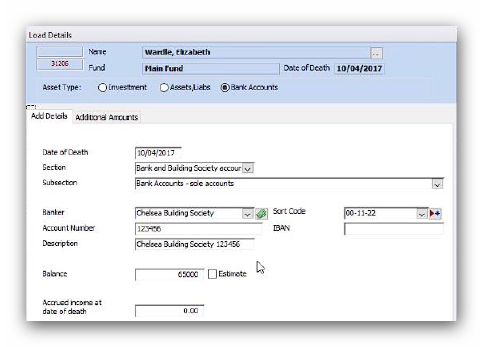
If you need to attach a new bank or building society click on the Add Banker button to open the Select Entity window. Then select the appropriate bank from the list.
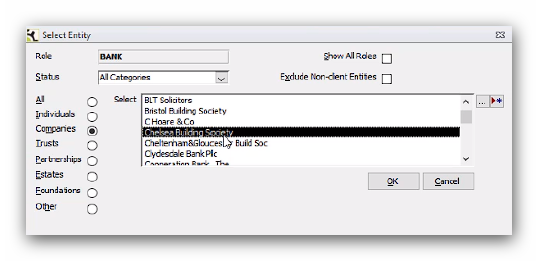
If the account is with a bank not on the list, click the Add New Entry button to add a new bank entity into the database. You can also use the Edit button to edit a bank entity from this screen.
Once the bank is selected, add the 'Account Number' and 'Balance'. The 'Description' will automatically populate with the account details, but you can enter your own, if needed. You can also enter a value for any 'Accrued income at the date of death' and tick the 'Estimate' box, if required.
Then click Add to save it to the estate.
When you add a bank account to the estate at the date of death Troika automatically adds an additional entry for accruals, in the same way does for investments, so even if you did not enter an amount for an accrual on the Load Details window a zero accrual entry will be created that can be edited at a later date.
You can add bank accounts even if you do not have records of the balances. Add the account with a zero balance and then edit the value at a later date, once you have received the details.
Editing and Deleting Bank Accounts
Editing bank account and accruals is similar to editing assets and liabilities.
Locate the entry in the Load Data window and double click on the value. Then enter the 'Amended Value' and click 'Update'.
To delete a bank account, first delete the transaction from the Load Data window as you would delete any other asset. However, this will only remove the bank account from the Load Data window and will not remove the details of the bank from the estate.
To do this, exit Load Data and select the Bank Account Details – Edit menu option from the Client tab. Select the relevant account and click Edit.
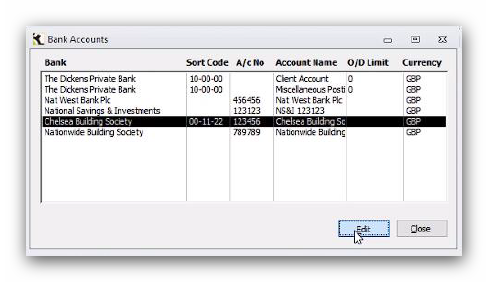
This will open the Edit Bank Details window and from here you can delete the account. This will delete the selected account from the estate and not the bank's record from the database.
This article was last reviewed 05/2020.