
Managing investments is similar to managing assets and liabilities, however you first need to make sure you have ticked the IHT411 and/or IHT412 option (or IHT417, if you have foreign stocks and shares included in the estate) on the Inheritance Tax Account tab of Estate Details - Edit.
Adding Investments
Within Wealth Management, the Client tab, select the Load Data menu option. In Load Data make sure that the Period is set to the date of death and select the 'IHT Details' button. The Load Details window automatically defaults to the Investment selection.
Select the Investment Type, subsection and Investment using the drop-down menus for each.
Enter the number of Units and then either the Unit Price or total Value.
You can also enter a value for any Accrued income at the date of death and tick the 'Estimate' box if required.
Then click Add to save the investment to the estate.
Troika comes preloaded with the FTSE100 and certain treasury stock, however if an investment is not in the database, click the Add New Entry button to open up the 'Add New Investment Details' window.
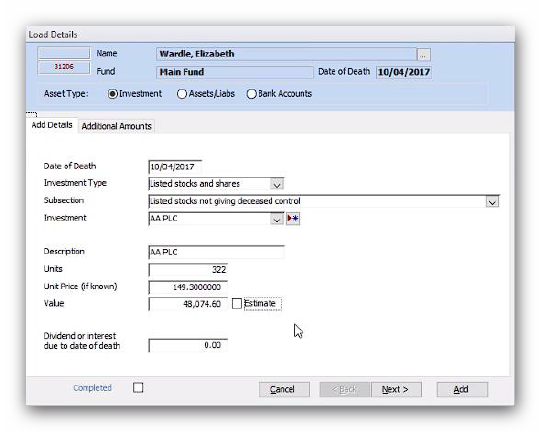
Troika comes preloaded with the FTSE100 and certain treasury stock, however if an investment is not in the database, click the Add New Entry button to open up the 'Add New Investment Details' window:
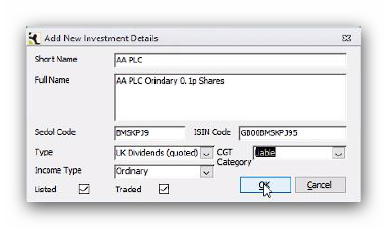
Enter a short name (which will be used to adequately identify the investment when searching the database for it) and a full name (which will be displayed on the client investment schedules). Complete the rest of the details appropriately and click OK.
When you add an investment to the estate at the date of death, Troika automatically adds an additional entry for accruals so even if you did not enter an amount for an accrual in the Load Details window, a zero accrual entry will be created that can be edited at a later date if required:
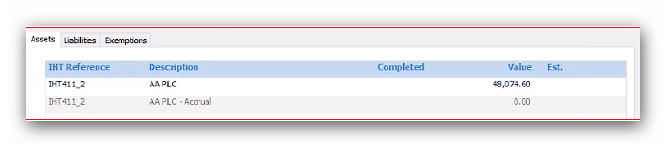
If you have numerous investments added to an estate, Troika will automatically produce an overflow schedule for you to attach to the IHT form.
Editing and Deleting Investments
Editing investments and investment accruals is similar to editing assets and liabilities.
Locate the entry in the Load Data window. Using the Filter option to refine the list to only IHT411 or IHT412 entries can be very helpful here, if you have a large number of investment accruals to update.
Double click on the value to open the Edit Transaction window:
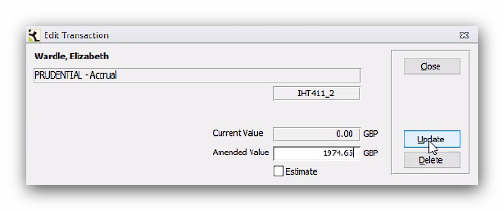
Then enter the 'Amended Value' and click 'Update'.
If you need to delete an investment, first delete the transaction from the Load Data window by double clicking on the value and selecting Delete. However, this will still leave a zero entry for the investment ledger in the Load Data screen.
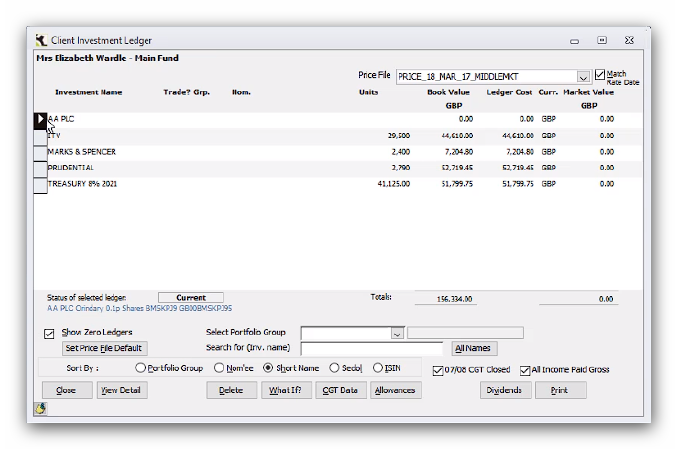
To remove the entry completely, exit Load Data and select the Investment Ledgers menu option from Wealth Management, Client tab.
From the 'Client Investment Ledger' window, tick the 'Show Zero Ledgers' check box on the bottom left and locate the required investment. Highlight the entry and select 'Delete':
This article was last reviewed 05/2020.