
The IHT forms can be produced at any time, but you may wish to wait until you have added all the details for the estate at the date of death and have had the assets and liabilities confirmed by the executors.
To create an IHT form, within Wealth Management, Client tab, select either the menu option Estate Details - Edit (and navigate to the 'Forms' tab), or IHT & Other Tax Forms.
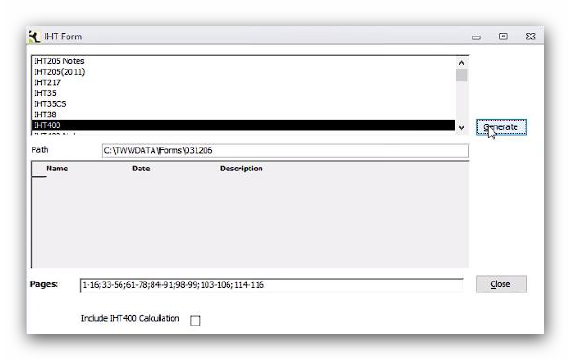
Highlight the form you require and click 'Generate':
Depending on the version of Adobe you are using you may see an Adobe security warning which will appear in yellow at the top of the screen. Follow the instructions within the following article, if you wish your form to fill automatically:
Why do I always get an Adobe Security Warning when running IHT forms?
You can generate the form as many times as you need, but make sure that when you exit the form in Adobe, you remember to save.
Troika keeps a record of each form that has been produced and will list them in the box below the available forms. From this list you can choose to:
- Regenerate this version of the form,
- View overflow schedules,
- View form, or
- Delete selected form history from this client.
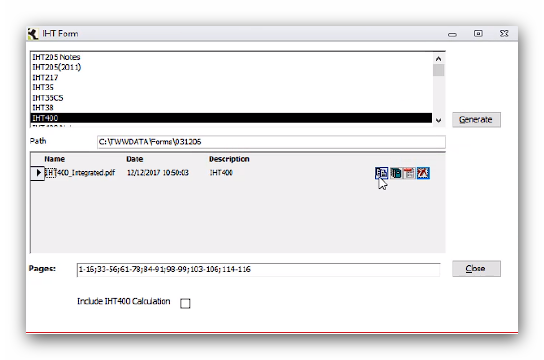
There are a few fields on the IHT form that require manual entry. Once you have generated the form from within Troika you can enter manual data into the form and save it. To ensure that manually entered data is not overwritten when you need to run a further form, you need to ensure you select this regenerate option to run your further form, instead of the 'Generate' button. The following article may assist further:
What's different between the 'Generate' and 'Regenerate this version of the form' IHT form options?
Please use the 'Delete' option with caution. Any forms deleted using the 'Delete' option here cannot be retrieved.
Troika also lists the 'Pages' of the IHT forms you are using on your estate. Adobe will, by default, attempt to print the entire form including blank and unused pages. If you need to print the form you can copy and paste this 'Pages' list into the appropriate box of the print page in Adobe and this will prevent this. More information can be found in the following article:
I would like to print only the IHT forms/pages specific to my estate. Can I do this?
Once the IHT form has been submitted to the HMRC you need to check the 'IHT form Submitted' box on the 'Inheritance Tax Account' tab in Estate Details - Edit. This will add a 'Schedule of Correctives' button underneath the check box. It will also affect the Load Data window - the 'IHT Details' button would change to 'Additions' and the date the IHT form was submitted will be displayed in green underneath the button.
This article was last reviewed 05/2020.