
SQL Users
SQL users 'TROIKA_USER' and 'TROIKA_SQL' are usually set up during the initial installation:
- 'TROIKA_USER' is a SQL user used for the ODBC data connections.
- 'TROIKA_SQL' is a SQL user used for our SQL Utility (which performs maintenance tasks against the SQL database, where SQL Express is installed), if required. More information on the Troika SQL Utility can be found here.
The 'TROIKA_USER' SQL User
The 'TROIKA_USER' SQL user is commonly set with a SQL authentication password which doesn't expire. This is because changing the password regularly will require each and every ODBC connection to that SQL database to be amended regularly too. It is possible to use Windows Authentication here, if preferred.
The 'TROIKA_USER' SQL user should instead be attached to a specifically configured database role called 'db_TR_USER', rather than using any built-in database roles. These out-of-the-box roles are a little too broad and have some things in there that should not be applied to users. The 'db_TR_USER' role has just enough things it can do within SQL to function, and is indeed the minimum level of access needed to run the application.
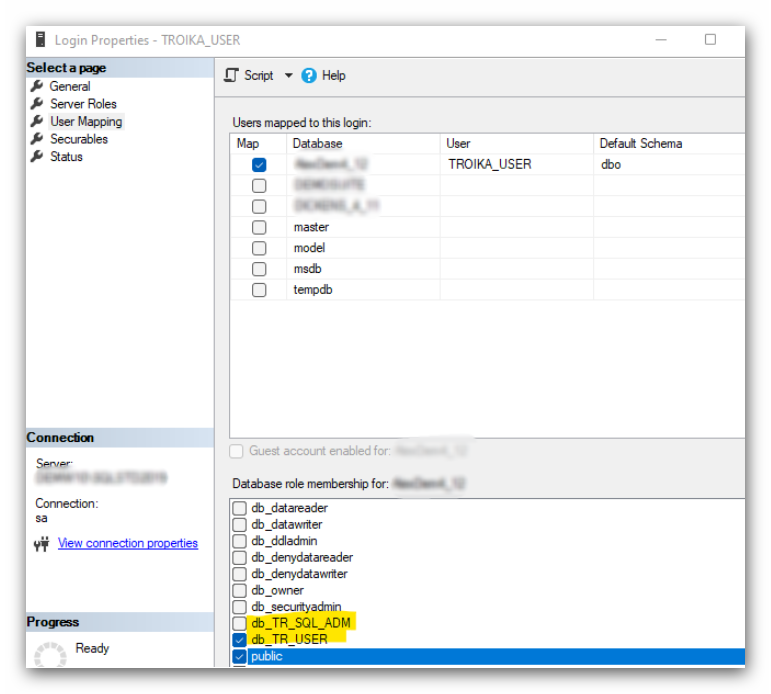
If the 'db_TR_USER' database role is not present, run the attached 'Create_db_TR_USER_Role.sql' script against your Troika SQL database to add it.
Do not worry about the 'db_TR_SQL_ADM' role for this SQL user. This is a role only the TROIKA_SQL SQL user account is attached to.
The 'TROIKA_SQL ' SQL User
As 'TROIKA_USER', the 'TROIKA_SQL' SQL user should be attached to a specifically configured database role called 'db_TR_SQL_ADM', rather than using any built in database roles. The 'db_TR_SQL_ADM' role has just enough things it can do within SQL to function for the maintenance tasks and Troika SQL Utility, and is indeed the minimum level of access needed to run these.
If the 'db_TR_SQL_ADM' database role is not present, run the attached 'Create_db_TR_SQL_ADM_Role.sql' script against your Troika SQL database to add it.